
Your next customer starts here.
Create your website, answer enquiries and book estimate appointments with Mike.
Your website Live
New enquiry 2m ago
The business assistant for contractors
Get found online. Turn enquiries into jobs. Send estimates and invoices. Keep your customers, team and paperwork moving—all from one app.
And get 3 months 100% free. No payment required.
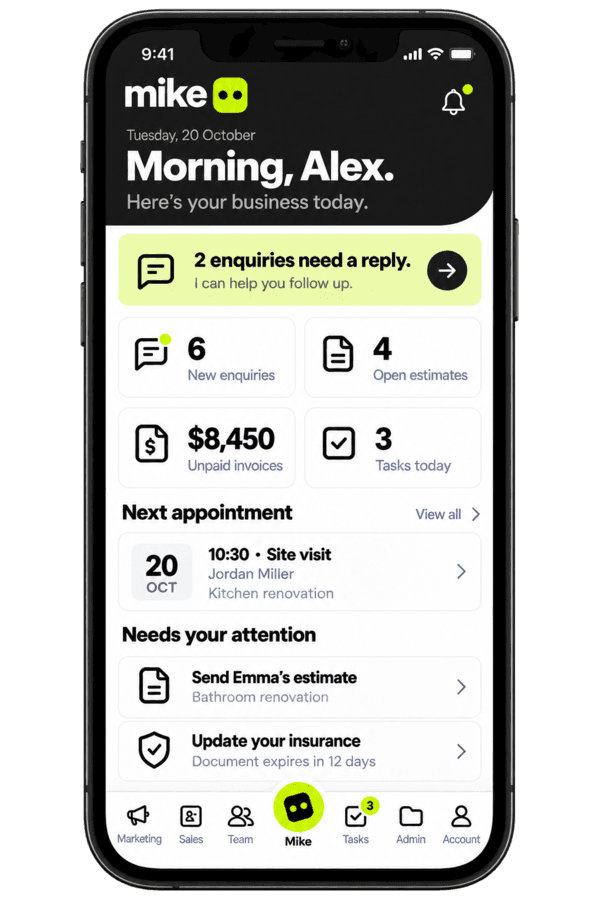
One app. Less admin.
Create your website, answer enquiries and book estimate appointments with Mike.
Tell Mike what the job involves. Review the draft, then send it when it feels right.
€12,000
Ready to reviewKeep invoices, documents, reminders and the next action together.
How it works
Use plain language. Describe the job, ask a question or give an instruction.
Mike drafts your site, messages, documents and estimates. You stay in control.
Send it, share it or make changes. Mike keeps track of what comes next.
One assistant across the business
Mike connects the work that normally lives in separate apps, message threads and folders.
Get found
Tell Mike what you do, where you work and what makes your business different. Mike turns the conversation into a polished site you can review, publish and connect to your own domain.
Explore featureStay responsive
Mike’s website chatbot answers common questions, qualifies new enquiries and moves serious prospects toward the next step—using the rules and knowledge you approve.
Explore featureFill the calendar
Offer estimate calls and site visits without the back-and-forth. Mike can suggest available times in chat, collect the details and place the appointment on your calendar.
Explore featureWin the job
Explain the work, attach your reference documents and let Mike prepare the draft. Review products, services, quantities and pricing before you send—then turn an accepted estimate into an invoice.
Explore featureKeep every job moving
Mike keeps prospects, customers, conversations, estimates and appointments together. It highlights the next useful action so opportunities do not disappear under the day’s work.
Explore featureUnderstand the admin
Upload a letter or email you received. Mike explains it in plain language, highlights deadlines and risks, suggests actions and prepares a response for your approval.
Explore featureRun the day together
Invite your crew, control access and keep field activity attached to the right job—from employment documents and GPS clock-ins to completion photos and on-site estimate drafts.
Explore featureQuestions, answered
No. Mike prepares drafts, organises context and suggests actions. You review and approve customer-facing work, pricing and important decisions.
Yes. You will be able to publish on a Mike address first and connect a domain you already own when you are ready.
You choose the rules. Mike can use approved fixed prices or ranges and can hand the conversation back to you when a job needs a closer look.
Mike is $9.99 per month with every feature included, plus $5.99 for each additional team member. Subscriptions are managed inside the app; waitlist members get their first three months 100% free.
Mike is being built in stages. The roadmap labels planned capabilities clearly, and waitlist members will receive release updates.